
Environmental Reporting for BFI National Lottery Awardees
Some BFI National Lottery awardees are required to report on their environmental impacts using Julie’s Bicycle’s Creative Climate Tools (CC Tools) as part of their funding requirements — read on and refer to Who needs to report to understand more and check your eligibility.
Reporting help us build a better picture of the environmental impacts of the screen sector ‘beyond production’ and inform the support we provide in the future.
The guidance below aims to help awardees in reporting on their impacts using the Julie’s Bicycle’s Creative Climate Tools (CC Tools).

Complete ‘BEYOND CARBON’ reporting first.
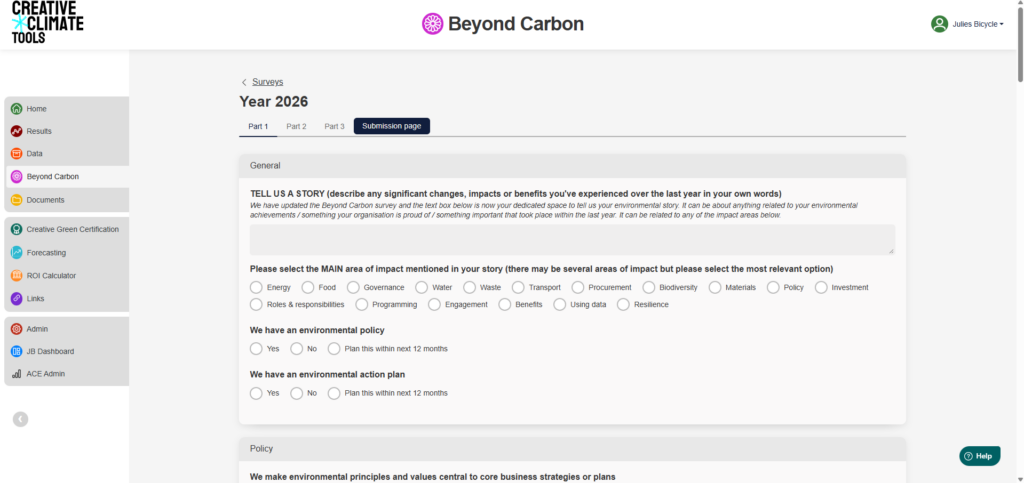
Preview of Beyond Carbon – click to enlarge.
The ‘Beyond Carbon’ checklist does not require carbon accounting or measurement – just a knowledge of your environmental impact approaches.
The checklist is a great way to capture how you are putting the principle of environmental sustainability into practice – from environmental commitments and plans to operational good practice and audience engagement. The checklist comprises mainly of multiple choice questions, and should take less than 15 minutes to complete.
Please complete and submit the Beyond Carbon checklist through the CC Tools alongside your carbon footprint to complete your Environmental Impact Reporting. If you can’t complete a carbon footprint, completing Beyond Carbon is the minimum requirement.
When to report
You can use the CC Tools at any time, but there are different reporting timelines depending on your project.
Fixed term projects: If you are funded for a fixed term project that doesn’t align with the financial year, you should report your carbon footprint as soon as your project is completed and prior to your final drawdown request.
Multi-annual awardees: Your designated reporting window is between 1 May – 15 July 2027, but you are welcome to report earlier if it suits you.

Report across your whole organisation’s activity, not just your BFI-funded activity.
Use your organisation’s legal name (as provided to the BFI) when signing up, and make sure all your organisation’s activity is under one account. You can make multiple footprints within one CC Tools account if it makes sense for your organisation (e.g. one footprint per office or programme), but it does not need to align to specifically funded activities.
For organisations funded by both the BFI and ACE: Please ensure when signing up you select both ‘BFI’ AND the ‘ACE 23-26 portfolio’ under the ‘Funding portfolio’ section. This ensures your data is reported correctly across both programmes. If you already have an account, click your name in the top-right and navigate to ‘Organisation Details’.
Who needs to report
If your organisation receives BFI National Lottery funding via any of the below programmes then you need to submit one environmental impact report (including both a carbon footprint and Beyond Carbon report, unless specified) for each year that you receive funding.
If you receive multiple awards from the BFI, you only need to submit one organisational environmental impact report. For each year’s reporting period you should report on your activity for the last financial year.
- Audiences:
- Audience Projects Fund (both footprint and Beyond Carbon)
- Film Audience Network (both footprint and Beyond Carbon for Film Hub Lead Organisations only; note there is no reporting requirement for organisations funded through the FHLOs, though we encourage Beyond Carbon completion)
- Open Cinema (Beyond Carbon only)
- Education and Heritage:
- Screen Heritage Resilience and Project (both carbon footprint and Beyond Carbon)
- Teaching with Film (both carbon footprint and Beyond Carbon)
- International:
- UK Focus (Beyond Carbon only)
- International Connections – Travel Grant Fund (carbon footprint of attendees collated by British Council, and Beyond Carbon for British Council activities)
- International Connections – Group Attendance (carbon footprint only, collated by BFI)
- Skills & workforce development:
- Young Creatives (both carbon footprint and Beyond Carbon)
- Skills Fund, including Business Development (Beyond Carbon only)
- Good Work Programme for Screen (Beyond Carbon only)
What areas of environmental impact to report on
The aim of reporting is to help you develop an understanding of the environmental impacts of your organisation, across both your carbon footprint and Beyond Carbon data. The main impact areas for reporting will depend on your organisation, but may include:
- Energy
- Water
- Waste
- Materials
- Business Travel (see our guide here)
- Audience Travel (see our guide here)
We recognise that there are various challenges to reporting for different organisations. Plan ahead: you may need to work with colleagues and/or contractors across your organisation to gather data. The expectation is not to have a completely comprehensive carbon footprint. There may be some areas that you are unable to collect data for, and you’ll find plenty of guidance for troubleshooting in our FAQs below. Focus on Beyond Carbon if you are struggling with carbon footprinting.
If you cannot report, there are ‘Additional information’ boxes on each page of the CC Tools platform – please provide information there about why you were unable to report.

Using the Tools
When creating an account, please ensure you select ‘BFI’ under the ‘Funding portfolio’ title, and use your legal organisational name.
For organisations funded by both the BFI and ACE: Please ensure you select both ‘BFI’ AND the ‘23-26 NPO’ (or ‘IPSO’, if relevant) under the ‘Funding portfolio’ section. This ensures your data is reported correctly across both programmes.
If you suspect your organisation already has an account, or has previously submitted data: watch this 30 second video snippet to understand how to add multiple users to one account. If you know your organisation has an existing account but you are unable to log in, please contact our team using the ‘BFI Sustainable Screen Programme‘ option in the ‘What is this enquiry about?‘ form field.
Even if you are recieving different BFI Awards, please report at an organisational level, under one organisational account. This reduces the amount of work you have to do to clarify the proportion of your footprint which is attributed to BFI funded activity.
Never used the Tools, or need a refresher?
Follow the link below to watch our playlist of step by step how-to videos for using the Tools.
Additional support & FAQs
For any queries relating to reporting beyond this page, please contact our team, using the ‘BFI Sustainable Screen Programme‘ option in the ‘What is this enquiry about?‘ form field.
The BFI National Lottery Sustainable Screen sets out to support BFI National Lottery awardees and the wider screen sector to minimise the impact of filmmaking and move towards positive environmental change.
Julie’s Bicycle delivers the “Beyond Production” strand, supporting over 100 cinemas, film festivals, cinemas, archives and sector support bodies to develop environmental understanding and practice through our free-to-use Creative Climate Tools, webinars, workshops, one-to-one support, and online resource hub.
Initially launched in Autumn 2023, we have received funding for another three years (2026-2029), helping to ensure longer-term support for the UK screen sector as we transition towards a greener, more resilient future. See our 2023 – 2026 impact.
There are different reporting timelines depending on your project.
Fixed term projects: If you are funded for a fixed term project that doesn’t align with the financial year, you should report as soon as your project is completed and prior to your final drawdown request.
Multi-annual awardees: Your designated reporting window is between 1 May – 30 June 2027.
If you have the data available, you can begin to add data to the tools at any time. You can report Beyond Carbon at any time.
If there is a reason you cannot complete reporting by Monday 30th June 2027 (e.g. because your activities run in line with the school year for educational organisations) and you haven’t already told us, please send a message to the BFI Helpdesk to let us know.
Using a carbon calculator tool such as the Julie’s Bicycle Creative Climate Tools can help to build your understanding of the environmental impacts of your activities and day to day operations. The results of a carbon footprint calculation can clearly show you the areas of your organisation’s activity which have the greatest environmental impact.
Highlighting your main areas of impact can help you to focus and prioritise your environmental actions, set targets and track progress over time.
Due to the variety of projects which are funded by the BFI, to simplify the process for awardees and provide meaningful carbon footprint data it is better to focus on the whole organisation.
Many organisations already calculate a carbon footprint annually for their corporate or other funder reporting. We are asking you for your organisational footprint to reduce the amount of work you have to do to clarify the proportion of your footprint which is attributed to BFI funded activity.
Focus on thinking about your whole organisation’s activity, rather than the funded activity.
Use the footprint options on the Creative Climate Tools as a guide.
- If your organisation is building based, then start with an Office or Venue/Cultural Building footprint.
- Then think about additional activities that you deliver that are funded by the BFI.
- If you deliver a tour, then use the Tour footprint tool to report this.
- If you deliver a festival, use the Indoor or Outdoor Event tools to report this.
- If you deliver a training course, use the Indoor Event tool to report this.
No, you do not need to submit the same data again in a different footprint to report for the BFI. Make sure to add the BFI to your profile as a funding organisation.
- Click on top right (under organisation name) select ‘organisation details’.
- Under funding portfolio select BFI (multiple can be selected e.g. BFI and ACE NPO)
- Select Save.
The reporting you already submit will cover any building impacts. Then you will want to think about any specific BFI funded activity e.g. a tour, festival or training course which can be reported on separately using the project footprint tools.
When you’re logged in, click on your organisation’s legal name (top right of the homepage). In the drop-down, click ‘Organisation Details.’ In the tabs across the top, click on ‘Add new users’, enter their email address, then click ‘Add’ to send them a welcome invite email.
If your organisation doesn’t operate from an office or venue/cultural building, then think about the ‘Project’ tools on the CC tools and your BFI funded activity.
- If you deliver a tour, then use the Tour footprint tool to report this.
- If you deliver a festival, use the Indoor or Outdoor Event tools to report this.
- If you deliver a training course, use the Indoor Event tool to report this.
We have developed the BFI Sustainable Screen Resource Hub with trainings, top tips and case studies of climate action from screen sector organisations.
You can also find more information by watching our introductory webinar series:
Climate Literacy
Developing Environmental Priorities and Plans
Getting to Grips with Environmental Performance and Progress
You can also contact the JB team here, using the ‘BFI Sustainable Screen Programme’ option in the ‘What is this enquiry about?’ form field.